…the “Pivot to Hardware”. Now, that everyone feels the heat around the corner it is inevitable that everyone around you contracts a case of severe ROEED1, complete with all the symptoms such the diffusion model-generated breadboard picture posting or inane posturing about “hard tech” and “industrial capability”.
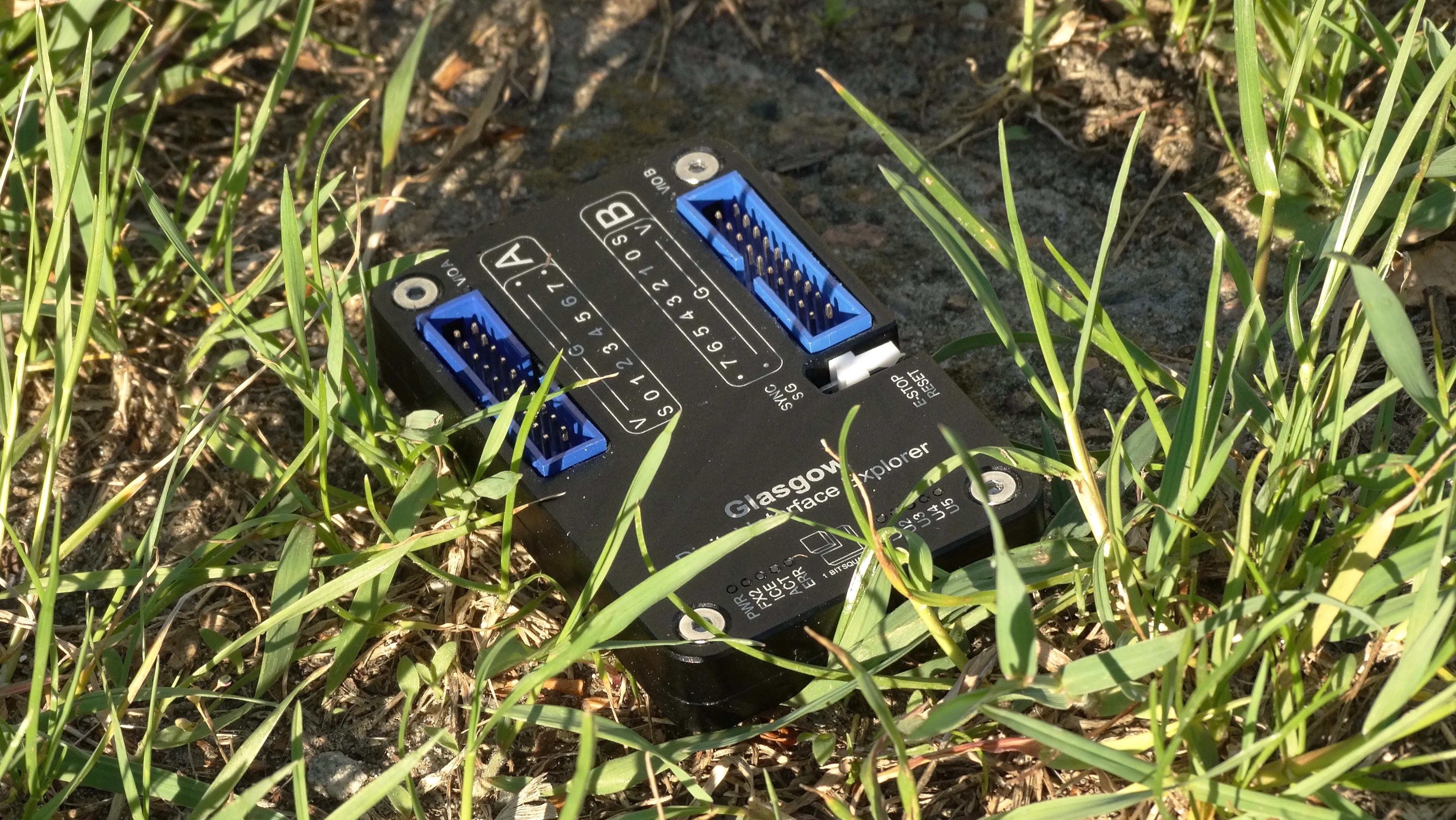
This is a short introduction to 2 of the applets that are currently present on the Glasgow Interface Explorer and an Exploration of 2 peripherals that were collecting dust on our desk for the last couple years. We hope this can provide some sort of educational value for an aspiring embedded-girl and maybe show off the value of having one on your workbench.
Peer Review Panel
This article was reviewed by 2 different catgirls both using the “it” pronoun in some shape or form respectfully. Deducing their identities from my social circle to mess with academic objectivity and to encourage academic misconduct is left as an exercise to the reader.
Reviewer 1: “writing style comes off a little unusual in comparison to the last few posts- […] …perhaps it’s because of the tutorial-esque goal, leading to little time spent discussing issues you’ve had - surprising, i thought you were unable to pass up an opportunity for self-deprecation.”
Reviewer 2: “Grebe out of 10; ship it”
Reviewer 3 was out of budget and out of scope for this article.
What is a Glasgow?
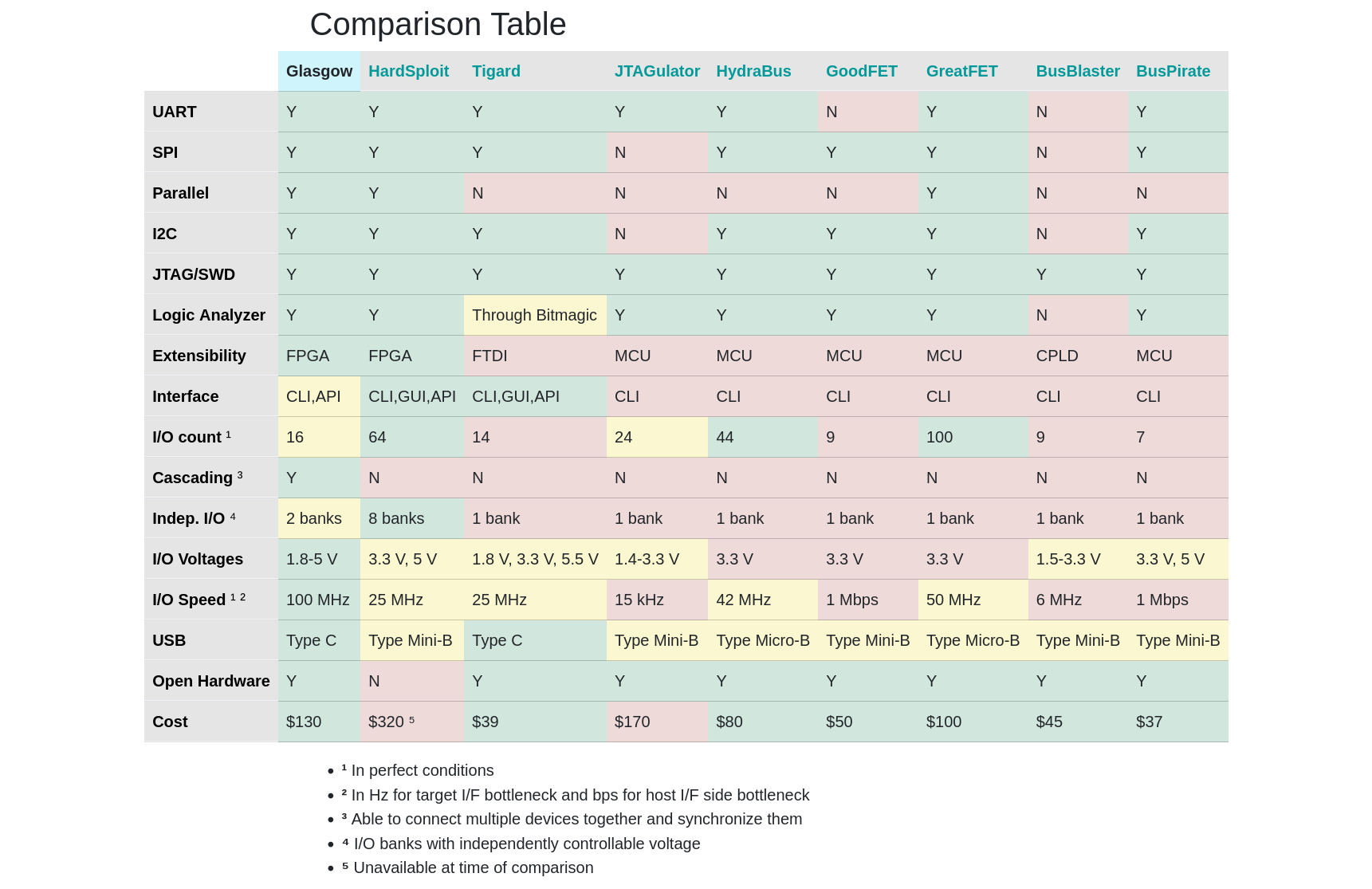
Referred to in the documentation as the “Swiss Army Knife of Electronics”, the Glasgow Interface Explorer is a tool that allows one to very quickly and efficiently communicate with a myriad (infinity) of interfaces. Unlike your standard fare Bus Pirates and whatnot the Glasgow is based around an FPGA, and switching applets entails a reconfiguration of it (made unnoticeably fast with the IceStorm toolchain). No bitbanging software crutches, everything is done in hardware. In a sense, the Glasgow is like a shapeshifter or a slimegirl that can morph to anything you can imagine. The complexity of this is greatly abstracted via Amaranth and a convenient architecture, so using it to communicate with peripherals ends up even easier than with an Arduino or similar. The CrowdSupply page for the Glasgow provides a nice comparison table between it and similar devices on the market
SCD-40 // i2c-controller
We’ve been feeling really tired and dizzy and sleepy often. There’s a myriad of reasons for that but the CO2 levels give us an excuse to buy things so an SCD-402 sensor module was procured from AliExpress.
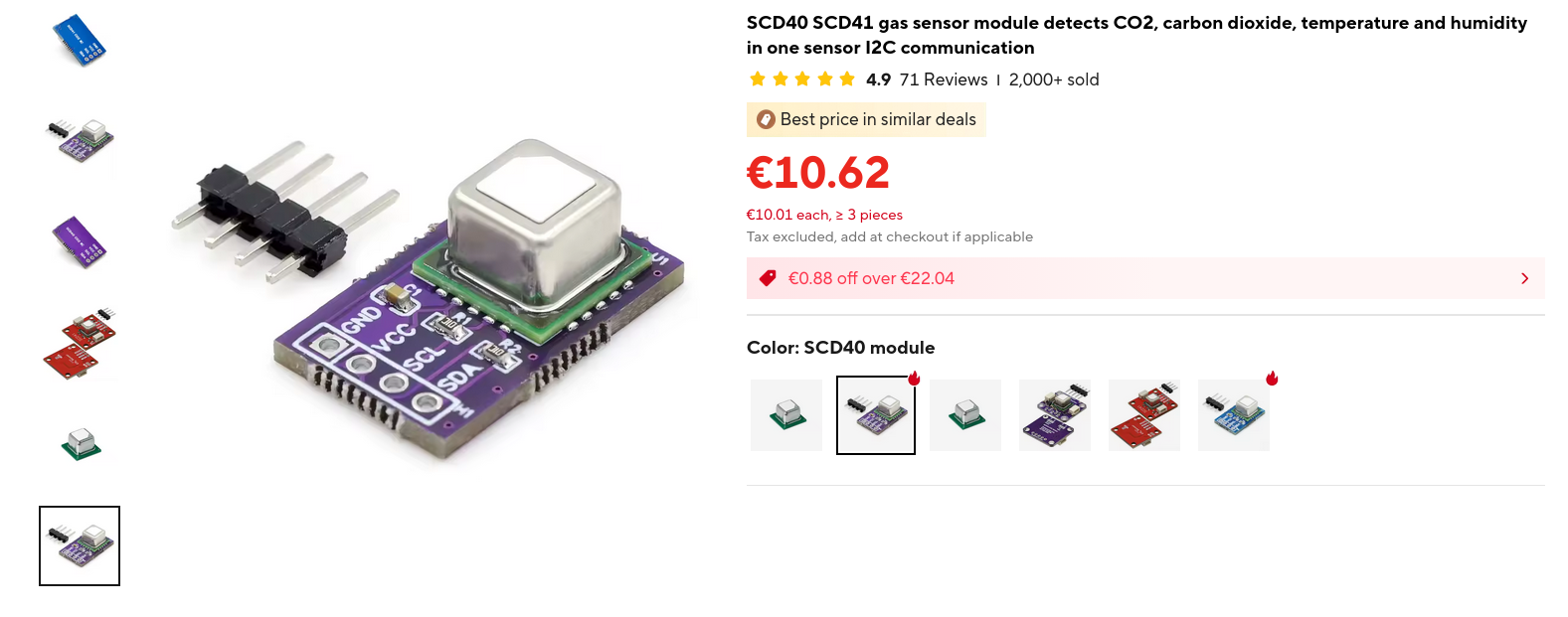
This sensor talks I2C, an interface we have fond middle school memories of. It goes into the i2c-controller shaped hole. Consulting the datasheet, we can see the two commands we care the most about, start_periodic_measurement and read_measurement, the documentation for which gives us instructions on how to decode the raw data into sensor readings
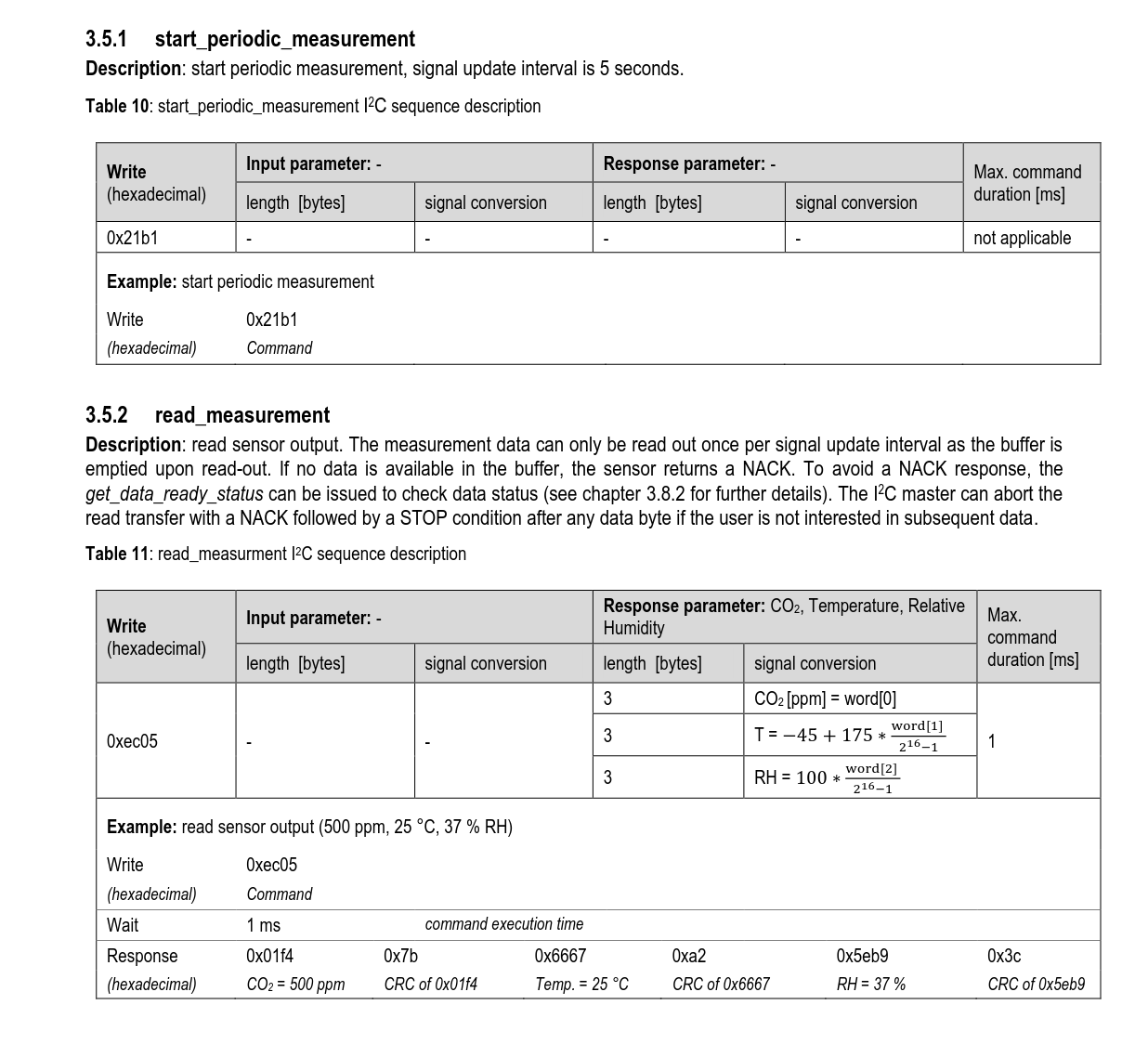
As a barebones example, here we simply write the startup sequence and call read_measurement in a loop, following the 5 second delay so that we don’t get NACKed3
import time

await i2c_iface.scan()
await i2c_iface.write(98, [ 0x21, 0xb1 ])

time.sleep(5)

while True:
 try:
    async with i2c_iface.transaction():
        await i2c_iface.write(98, [0xec, 0x05])
        data = await i2c_iface.read(98, 9)
    print(int.from_bytes(data[:2]))
    time.sleep(5)
To check the CO2 sensor, it was precariously suspended above a beaker of sodium bicarb solution, into which dilute HCl was occasionally poured. This way of testing the sensor was referred to as “chemistbrained” by Catherine.
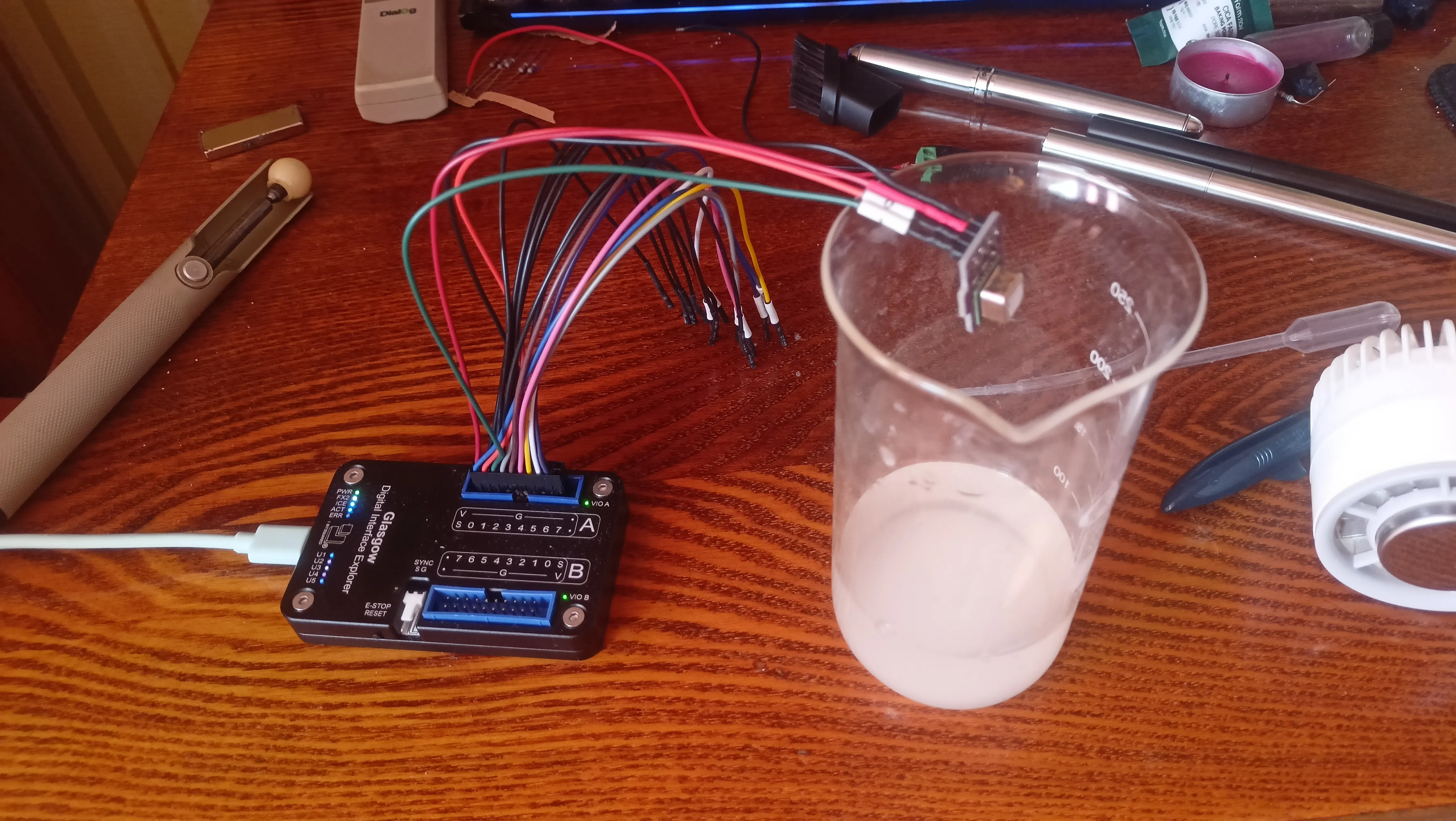
As a demo of what can be achieved, here’s a short script that spits the data into a csv, complete with the parsing of all the sensor data
import csv
import time
import datetime

def temp_calc(input):
    output = -45 + (175 * int.from_bytes(input[3:5]) / 65536)
    return output

def rh_calc(input):
    output = 100 * (int.from_bytes(input[6:8]) / 65536)
    return output

def co2_calc(input):
    output = int.from_bytes(input[:2])
    return output

await i2c_iface.scan()
await i2c_iface.write(98, [ 0x21, 0xb1 ])

time.sleep(5)

while True:
 try:
    async with i2c_iface.transaction():
        await i2c_iface.write(98, [0xec, 0x05])
        data = await i2c_iface.read(98, 9)
    print(data[:2])
    print(int.from_bytes(data[:2]))
    print(temp_calc(data))
    print(rh_calc(data))
    with open('out.csv', 'a', newline = '') as csvfile:
        writer = csv.writer(csvfile, delimiter=' ')
        writer.writerow([datetime.datetime.now(), co2_calc(data), temp_calc(data), rh_calc(data)])
    time.sleep(5)
 except KeyboardInterrupt:
    await device.set_voltage("AB", 0) # turn off the IO banks so we don't get NACKed on restart
    exit()
The csv then can be digested by the Fearsome and Horrible Python Leviathan of pandas and matplotlib into a Plot. (writing the Plot was easily the most consuming and annoying part of this article…)
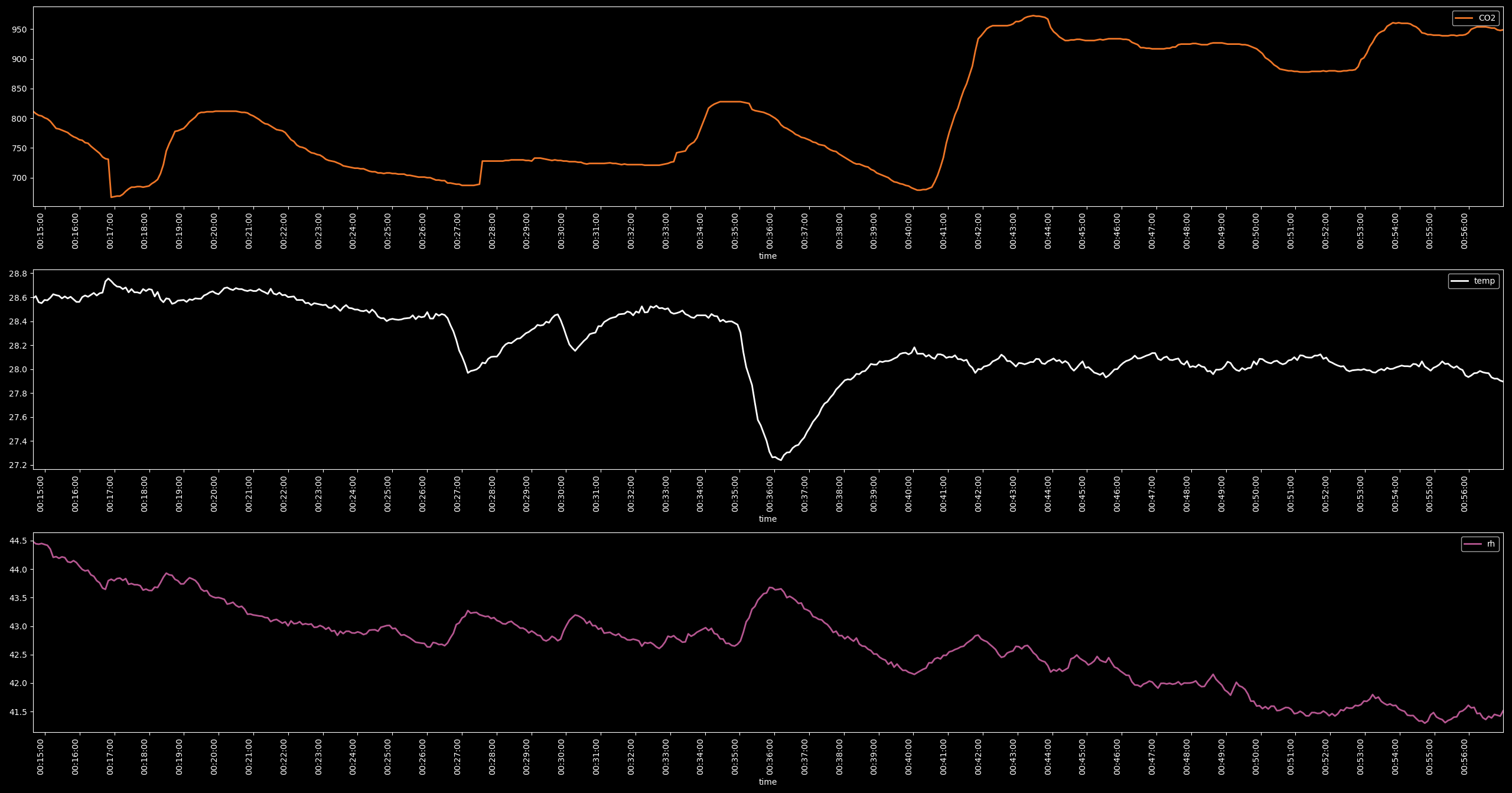
There also exists an SCD30 applet that writes the results to InfluxDB, which can be read with Grafana but we felt that a csv example is a little more approachable and we also didn’t read the documentation past the “Interface” taxon.
AD9833 // spi-controller
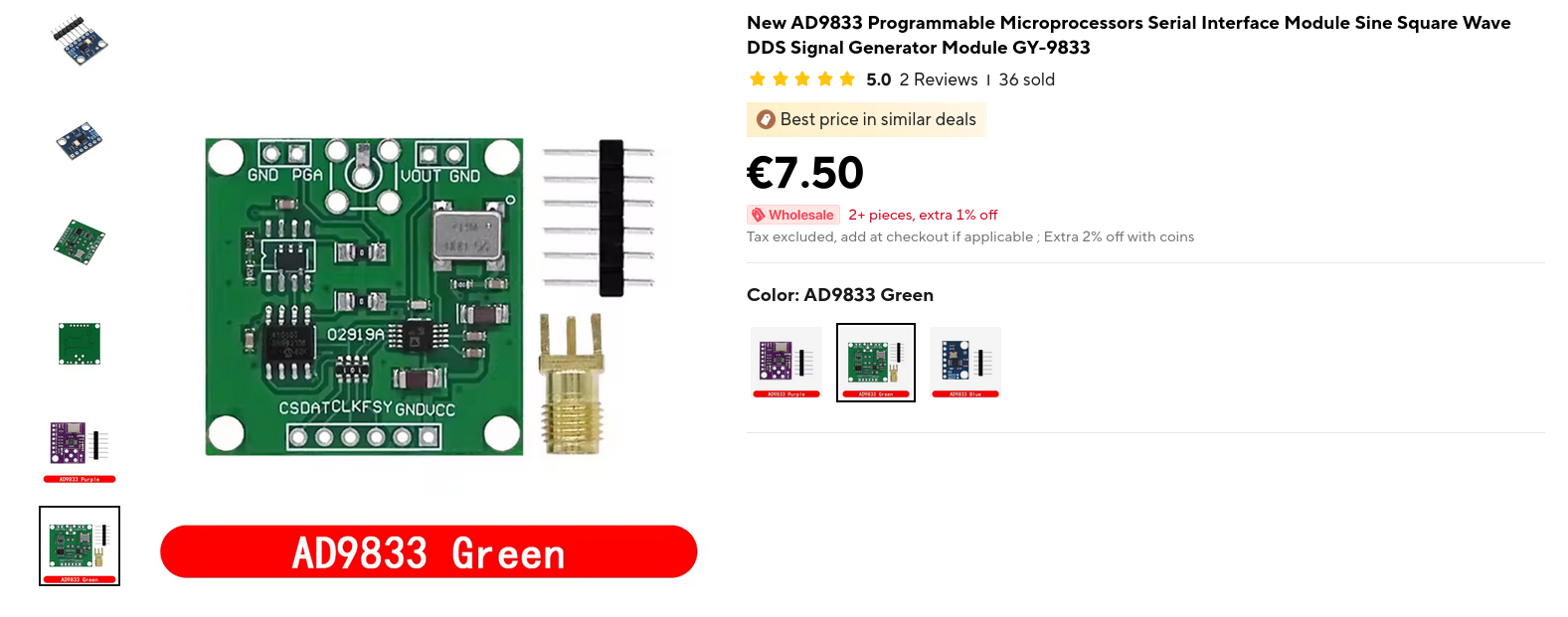
Using the spi-controller applet and a 8 euro AD9833 breakout board you can spin up a rudimentary waveform generator that effortlessly supports Python scripting within a few hours.
Before starting on the actual SPI section - to set up a REPL with some predefined commands you can, in fact: open the REPL of the applet of your liking with glasgow repl spi-controller and then simply load your script by reading the file and executing it in the repl. (update: now you can use --prelude)4
with open("script.py") as f: exec(f.read())
The AD98335 is an digital direct synthesis signal generator. The way you communicate with it is the weird “3-wire bus SPI-Special-Princess-Interface, Microwire, “DSP” and more” that we will treat as plain Motorola SPI instead. The AD9833 decided to be slightly different, and arbitrarily decided to rename what would normally be called “CS/Chip Select/Slave Select” to “FSYNC” and “MISO” to “DAT”. This might make sense given a ~slight difference in how Chip Select is handled here, but it does not make the already bad SPI pin naming situation any better.
There are three registers we care about in here. CONTROL, FREQ0, PHASE0. Control and Freq (““CONTROL FREAK””) being the most consequential ones to us.
CONTROL is a 16-bit register that, according to the datasheet looks like this:
https://github.com/GlasgowEmbedded/glasgow/pull/1169
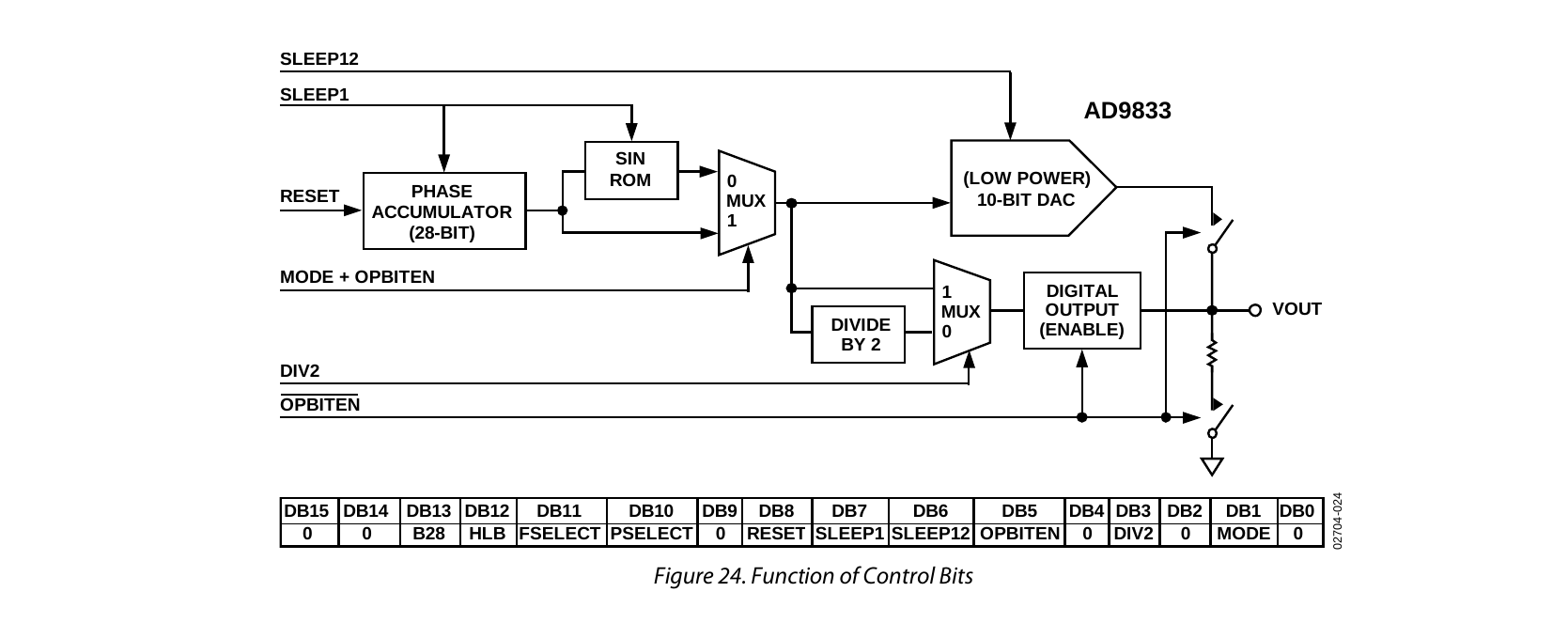
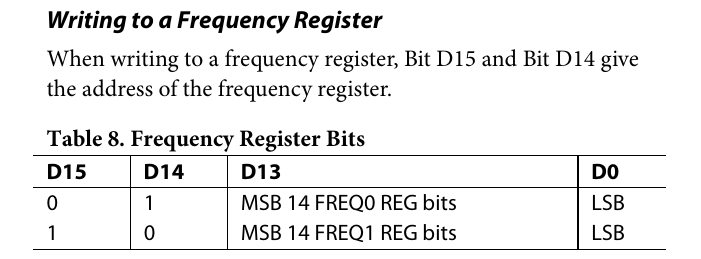
while FREQ0 consists of 2 16 bit registers each filled with 14 LSBs and 14 MSBs of the frequency value respectively.
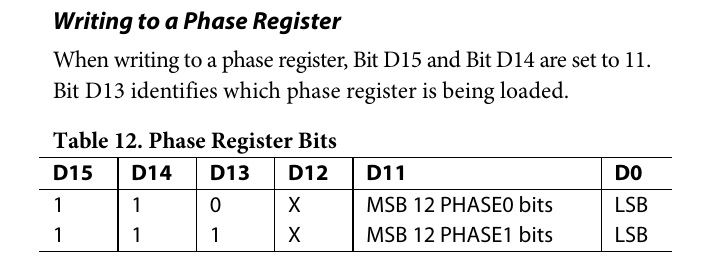
PHASE0 is simply one 16 bit register with 12 bits used for phase data
Weird acronyms aside (opbittern…?) the bits we want to change first are RESET and DB28 in CONTROL. RESET clears the internal registers of our device and sets the output to a pleasant and wholly harmless midrange of 0.3V. This is to make sure that nothing inside of our device can get spooked by a register write and push the output away from predictable (PHASE0 seems to do this…). DB28 enables a double-dip write mode that lets us write the LSBs and MSBs of a FREQ register without bothering CONTROL too much. The rest (FREQ1, PHASE1) we don’t really care about as they’re for special-embedded-fruitcakes who design actual products and instrumentation… Aspirational, but outside the scope of this article.
First, for the sake of ease of use, let’s write some helper functions. The function for CONTROL looks like this and consists of a set of very simple bit masks.
async def control_write(db28, hlb, reset, opbiten, mode):
    reg = 0x00
    reg |= db28 << 13
    reg |= hlb << 12
    reg |= reset << 8
    reg |= opbiten << 5
    reg |= mode << 1
    async with spi_iface.select():
     await spi_iface.write(reg.to_bytes(2, byteorder="big"))
The FREQ0 function is a bit more complicated, as we have to make sure that we don’t overflow our 28 bit register size and prepend the 14 bit registers with 2 address bits each.
def freq_calc(f):
    return (f * 268435456) / 25000000

async def b28_write(f):
    reg = int(freq_calc(f))
    if reg > 268435455:
        raise Exception("Value too big!")
    # split number into 2 14 bit blocks
    low_val = reg & 0x3FFF
    low_val = (1 << 14) | low_val
    high_val = (reg >> 14) & 0x3FFF
    high_val = (1 << 14) | high_val
    async with spi_iface.select():
        await spi_iface.write(low_val.to_bytes(2, byteorder="big"))
        await spi_iface.write(high_val.to_bytes(2, byteorder="big"))
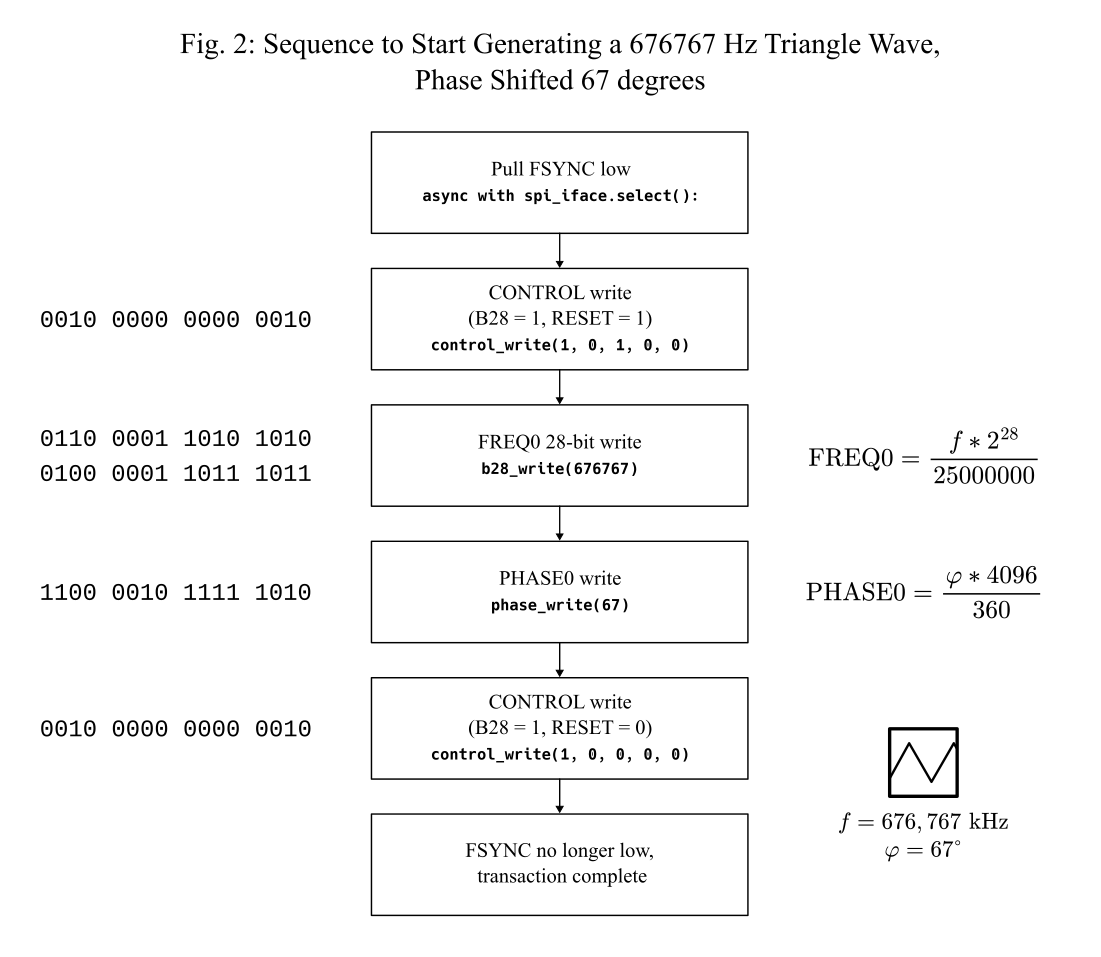
PHASE0 is similar, the formulas for computing register values are provided in the diagram a little bit further down the page.
def phase_calc(p):
    return (p / 360) * 4096

async def phase_write(p): # running this outside of reset seems to be scary. like a game of russian roulette
    reg = int(phase_calc(p))
    if reg > 4095:
        raise Exception("Value too big!")
    val = (12 << 12) | reg # prepend 1100 (12) to value
    print(val)
    async with spi_iface.select():
        await spi_iface.write(val.to_bytes(2, byteorder="big"))
A diagram of an average write sequence (inspired by what is suggested in AN-10706 provided below, in addition to the formulas used to provide the register values for FREQ0 and PHASE0
Conclusions
This, in general was… a pretty enjoyable foray into Digital Electronics. Not our preferred field or even subfield but the Glasgow made it much more tolerable and even pleasant at times. Most of our time wasn’t even spent figuring out the digital electronics stuff, but instead on digging through the Python Ecosystem™®.Before this, we have avoided learning Python like the plague due to a general dislike of how it goes about its way, so this time we have sunk an immeasurable amount of labour into trivialities such as “getting matplotlib to work”. Writing code for it feels like slowly dying in a desert. The next article after this one (ahead of schedule) will be a weird experimental tangent and after that there should be some actual inorganic chemistry. No hardware pivots. No nanoparticles brainrot. Just a few compounds synthesized and documented. Fully self-contained.
Supplementary Material
All the code (including Nix scripts, don’t ask me to write flakes, they’re not the kind of flake I want offered to me) is provided here. You can buy the Glasgow through these sources: link. Or you can wait until the RevD CrowdSupply campaign if you want to support the release of the next Improved Revision of the Glasgow Interface Explorer.
Conflicts of Interest
The unit used in this article was provided courtesy of Catherine Whitequark alongside a small amount of technical support and proofreading on the article. This is not a paid review and is written entirely out of our own volition. Our hand is not being forced into anything. Catherine was mean to us once or twice during the past few months.
Footnotes
-
Rapid Onset Electrical Engineering Dysphoria, early draft pick for the DSM-6 ↩
-
https://sensirion.com/media/documents/E0F04247/631EF271/CD_DS_SCD40_SCD41_Datasheet_D1.pdf ↩
-
The I2C commands here are enclosed in transaction blocks but that’s an “in most cases” best practice. You can leave them out and sometimes you actually have to leave them out. Nothing good under the sun in the embedded world. ↩
-
in the middle of the peer review process this was added so the oneliner is now unnecessary. but we are technically the reason why it’s there now so the section stays ↩
-
https://www.analog.com/media/en/technical-documentation/data-sheets/ad9833.pdf ↩
-
Analog Devices. AN-1070: Programming the AD9833/AD9834. https://www.analog.com/en/resources/app-notes/an-1070.html ↩